SAI VIGNESH M
Updated on 16-10-2026
If you’re like us and have spent time copying information between accounting applications and other tools to fill out invoices for forms and do other time-consuming bookkeeping tasks by hand because of those applications, then you’re probably no stranger to the pain of inter-app communication. We certainly are, and that’s exactly why we created the custom node for Ledgers in n8n.
Taylor Caldwell
So, let’s get real here—the truth is, as a result of running your business, you are utilizing a variety of software programs. Your accounting app, your CRM, your project management app if you have one, your e-commerce store if you are running one on the internet—the list of spreadsheets going back and forth is endless.
I remember speaking with a business owner a month ago regarding automating a process they tookthree hours each and every Friday to manually enter sales transactions for their online business into their bookkeeping system. Three hours a week. Every week. When asked if they could perhaps automate a process that they took three hours of each and every week to complete, they said, "I wouldn't even know where to start."
This discussion has stayed in my mind because this is not a one-time incident. It happens to thousands of different companies each day.
In short, n8n is a very powerful workflow automation platform and will let you connect many apps and automate actions between them—it's a superior and hackable alternative to Zapier/Make. What's so cool about n8n is the fact that it's a graphical and open-source platform and does not always require coding magic skills from the user to automate tasks.
However, there is a catch: "nodes" are actually necessary for n8n to communicate with different types of services. Now, previously, there was no Ledgers’ own node.
Much of this work has been dedicated to developing our own Ledgers node for n8n, as we believe that the functionality that n8n seeks to provide, specifically the automation of accounting, ought not to be reserved for big companies that can afford it, no matter how useful it is.
Our aim was clear: ensure that it is stupid-simple for anyone using Ledgers to connect the accounting side of things with the other stuff they get up to. No more manual data entry. No more copy/pasting data. No more tedious Fridays.
Let me paint you a picture of what is possible:
Now picture yourself running an internet service business. The client has filled out the booking form, the payment has been made, and wow! The invoice has been automatically created through the Ledgers system and sent and filed by the client. This is all accomplished without the intervention of any human element involved.
Now, every time you add a new customer to your CRM solution, that information is automatically entered into your Ledgers as a contact along with all your billing information, taxes, and addresses. This means that your sale teams and accounting teams will always be on the same page without needing to exchange one email.
Your Inventory Management System will identify that the stock is getting low and will generate a Purchase Order within the Ledgers program with the supplier's details, description of the goods to be purchased, and the price tag for each entered from your pre-existing catalog entries in your system.
You upload your receipts into your cloud storage solution, and this will assist you in viewing your receipts as they are instantly processed into Ledgers. The accountant will be wondering where the stack of receipts has disappeared that they had been working with.
Sarah was operating her online store. She was regularly exporting her sales data from Shopify to Ledgers every evening. She was manually creating her invoices. But once the n8n node was incorporated into her system, she found that for every sale she made using Shopify, she received her invoice automatically. Even thank-you emails were sent to her automatically. She saved an average of 10 hours weekly.
Raj offers consultancies. Raj uses project management tools for his time tracking. In his former system, Raj was totaling his hours at the end of every month to create his invoices. With n8n, once Raj was done with his project, n8n calculated his hours automatically, created an invoice for his project in Ledgers properly, and emailed it to his customer. Invoicing for Raj was from an afternoon job to minutes.
Unionization
The marketing firm owned by Maria was drowning in paperwork. Every new customer meant that five different systems were updated manually. However, with the Ledgers n8n node, the sign-up form is fully integrated into the CRM system and automatically creates contacts for Ledgers and sends project setup and welcome email sequences.
I promise you that you can use it even if you are not a developer. Now, this is a basic process:
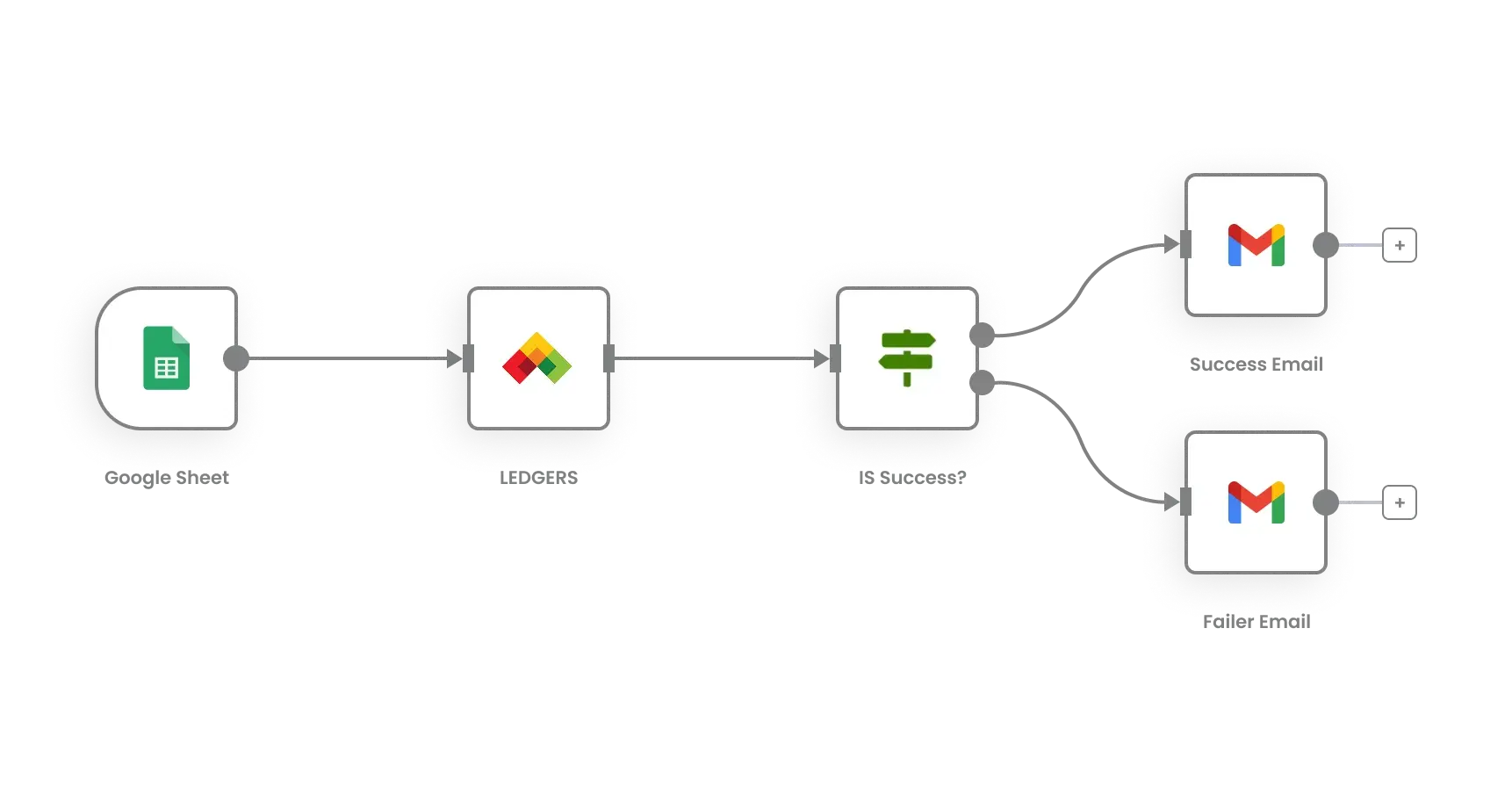
A workflow is created using n8n. This is a graphical workflow that uses a drag & drop feature. A trigger could be a new record inserted into a Google sheet, a webhook triggered by your website, or a timing trigger. Now comes the next part of the piece you need to complete: our Ledgers node. You will instruct this piece what you intend for it to do—create an invoice, make a new contact, update your new product item, and so on. The fields you have created for your trigger can now link into your fields within Ledgers. This is made very simple for you to do with n8n.
"That’s really what it is. If you can make a flow chart, you can do these automations."
Many of the automations on the list
For users wishing to make use of the developments, a provision has been made for the assimilation of most of Ledger's functionality into our node through the API for intensive use. The functionality includes Sales Invoices, Quotes, Credit Notes, Receipts, Purchase Invoices, Orders, Vouchers, Contacts, and Catalogs.
The node does authentication successfully, handles JSON and form submissions, error handling mechanisms are robust, and it also returns information in the response that will help the processing in your mules. There is also other functionality like dynamic field mapping and error checking before it is recorded in the ledger that we have added.
The feedback has simply been heartwarming. One user said that they've reduced two hours of entry per day. One user said they've seen a 95% reduction in errors on their invoices, as there is no longer an opportunity for humans to enter errors. Finally, one user said their monthly close process took three days versus one day.
Nevertheless, the most telling comment of all was made by a user who said, “Now I can focus my attention on building my business, rather than spending time on bookkeeping.”
Since you already have your Ledgers and n8n environment set up, adding a custom node will take only a matter of minutes. We also provide a fully-documented tutorial that you can import for your workflow needs. Even if you are relatively new to n8n overall, the learning curve is quite benign. Why not begin something relatively simple, like the automation of your business contacts and then progress from there? You do not have to automate your entire business on your very first day.
This customized nodes mean much more than an integration issue. This refers to democratization, which ensures that a technically enabled space of automations and efficiency tools for businesses is offered and accessible to businesses of all kinds and sizes.
Your time is valuable. The more time you spend on doing the menial tasks such as entering this data manually, the less time you have to spend with your customers, optimizing your product or service, or making plans for your next move. This is not a function of replacing people, but a function of liberating them to do the things that are important.
We are always working on improving the node based on your feedback. If you have any operation that is happening on your Ledgers that you would like us to implement functionality for or any workflow that you are attempting to build but just can't seem to get working that you would like our assistance on resolving the issues that stand in the way of your success for this project that is very much based on your needs.
Future of Accounting – This is not about having better software, but it's about having software work seamlessly together with each other. This Ledgers n8n node is the starting point for this purpose and what we believe can make a big difference.
So, if you are finding yourself taking more than an hour a week on the repetitive accounting tasks, perhaps the time has come to investigate what you could benefit from in the way of automation. Get the n8n tool, install our Ledgers node, and start tinkering with a simple workflow. It will astonish you, believe me.
However, if you do find yourself stuck and struggling to come up with ideas, do not hesitate to reach out to us. We are along this journey of discovery and knowledge together, and to tell you the truth, there is nothing that excites us more than seeing small businesses thrive when their operations begin to work for them and not against them.
