
SAI VIGNESH M
Updated on 30-07-2026
One area where Ledgers excels is its ability to perform complex automation tasks via integration with . This opens an entire world of possibilities in integrating your accounting software with the other applications you use. If you are tired of the limitations that come with traditional accounting software, n8n integration with Ledgers can turn all that around.
n8n is a workflow automation tool that connects different applications and automates tasks between them. Think of it as a bridge that lets Ledgers talk to your email, CRM, spreadsheets, messaging apps, and hundreds of other tools. When something happens in Ledgers, can trigger actions in other apps, and vice versa.
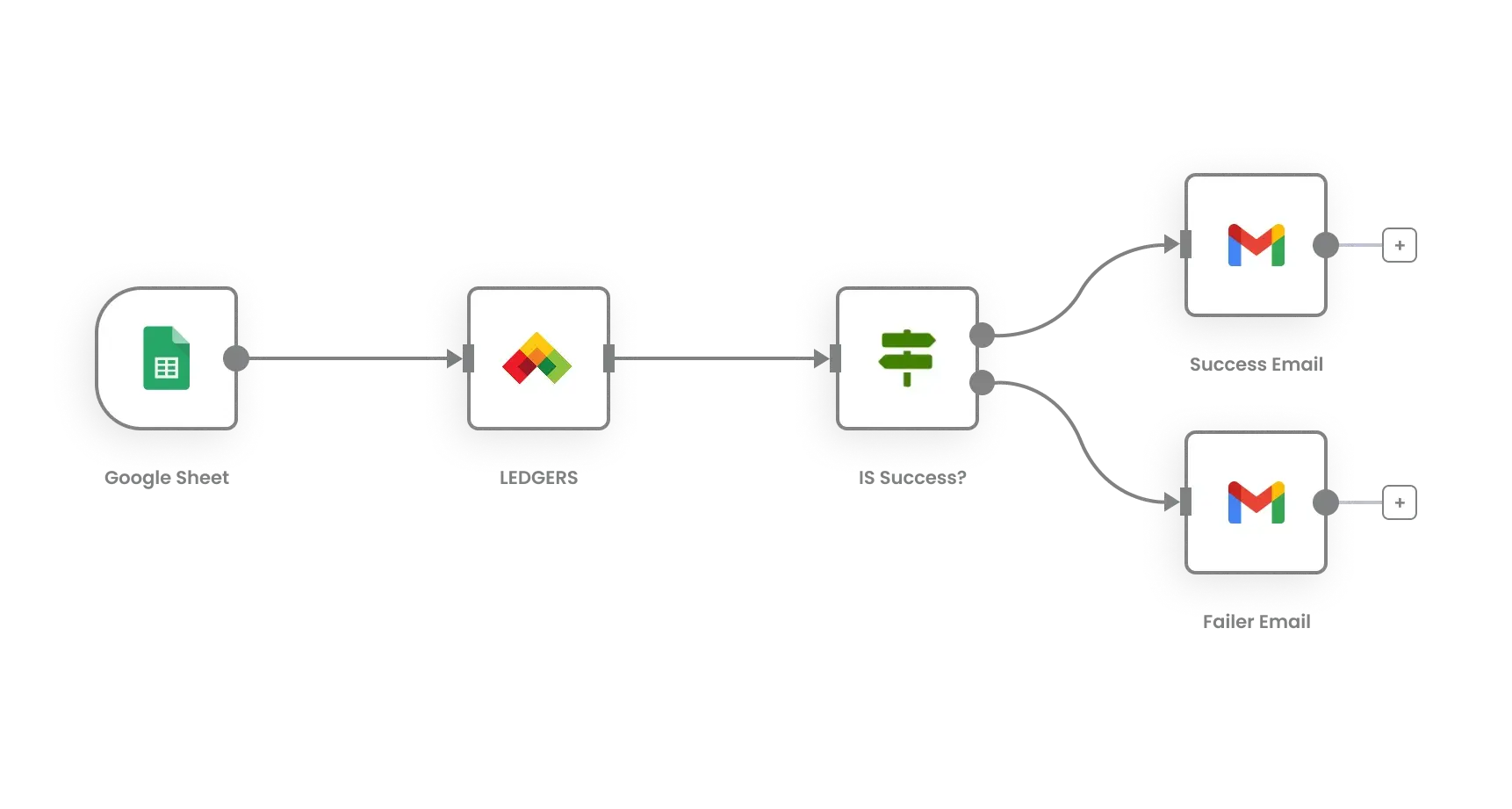
The beauty of n8n is that it's visual and user-friendly. You create workflows by connecting nodes on a canvas, similar to drawing a flowchart. Each node represents an action like creating an invoice in Ledgers, sending an email, updating a spreadsheet, or posting a message to Slack. You connect these nodes to build automation flows that match your exact business processes.
Now, imagine that a customer has filled out a contact form on your site. With n8n, this customer can be automatically created as a contact in Ledgers’ contacts list, a welcome email can be sent to the customer, the customer can be added to a mailing list, and a notification can be sent to the sales team on Slack. This is done without anyone needing to write a line of code. As you generate the invoice within Ledgers, n8n can instantly generate a formatted message on WhatsApp which goes directly to the client, generate a new event in a Google Sheet, or generate a new task in your project management tool, along with populating the sale event in the CRM. One event from Ledgers unleashes several other activities throughout the entire suite of tools. When the customer pays, n8n can automatically detect this via the Ledgers, shoot off a thank-you message with the payment confirmation, update your accounting sheet, remove any overdue payment reminders from your to-do list, and create a notification in your team message stream. Your whole team will be updated without any manual entries.
n8n has pre-built integrations with over 400 applications. You can connect Ledgers with Gmail for automated email workflows, Google Sheets for custom reporting, Slack or Microsoft Teams for team notifications, Trello or Asana for task management, and payment gateways for transaction syncing.
E-commerce businesses can connect their online store with Ledgers through n8n. When an order comes through Shopify or WooCommerce, n8n automatically creates the corresponding invoice in Ledgers, updates inventory, and generates shipping labels. Your online and offline operations stay perfectly synchronized.
Service businesses can integrate scheduling tools like Calendly with Ledgers. When a client books an appointment, n8n creates the client in Ledgers if they're new, generates an invoice for the service, and sends booking confirmation with payment details. Everything flows smoothly from booking to billing.
What makes n8n powerful is the ability to add conditional logic to your workflows. You can create rules like "if invoice amount is above 50,000 rupees, send it to the manager for approval via email, otherwise auto-approve and send to customer." Or "if a customer hasn't paid within 7 days of due date, send reminder email, if still not paid after 15 days, send SMS, if not paid after 30 days, create a task for collection team."
These conditional workflows handle complex business rules automatically. You're essentially teaching the system how to make decisions based on your business policies, and it executes them consistently every time.
n8n can transform data between different formats as it moves between apps. If Ledgers exports dates in one format but your spreadsheet needs another format, n8n handles the conversion. If you need to calculate values, combine information from multiple sources, or clean up data before it enters Ledgers, n8n does this automatically.
You can also enrich your Ledgers data using external sources. For instance, when adding a new contact, n8n can lookup company information from public databases, verify GST numbers through government APIs, and auto-fill additional details before saving to Ledgers.
Setting up n8n with Ledgers requires connecting both platforms through API credentials. Once connected, you start building workflows by selecting triggers and actions. A trigger might be "new invoice created in Ledgers" and actions could be "send email" or "update spreadsheet." You test the workflow and activate it.
n8n workflows run in the cloud continuously, watching for trigger conditions and executing actions automatically. You can monitor workflow execution, see logs of what happened, and troubleshoot if something goes wrong.
Workflow automation with n8n transforms Ledgers from standalone accounting software into the central hub of your entire business operations ecosystem.
