




MONISHA D
Updated on
30-07-2026
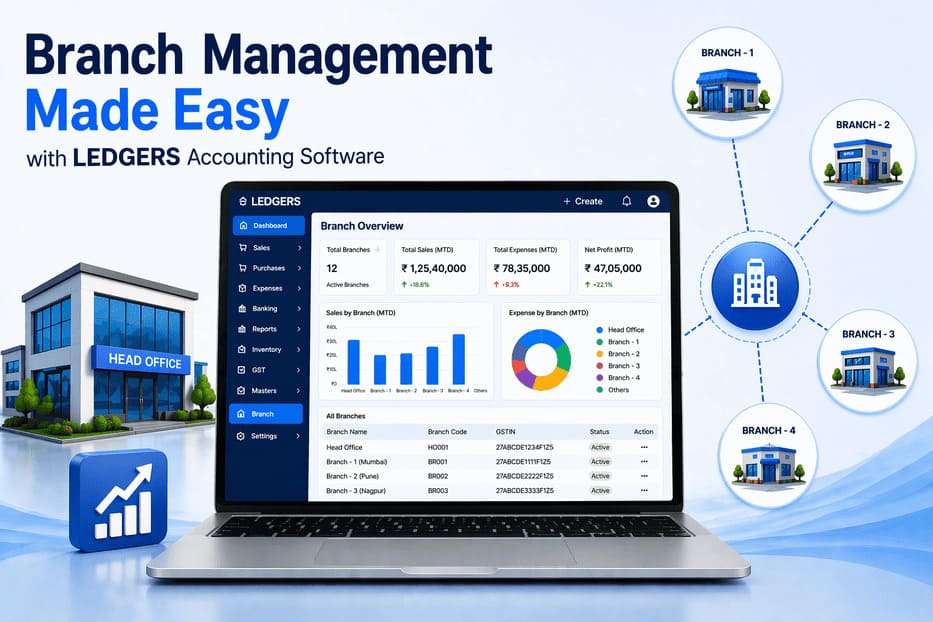
Branch Management Made Easy with Ledgers Accounting Software
Managing multiple business locations can become complex as your company grows. Whether you operate retail stores, warehouses, offices, service centers, or franchise outlets, handling branch-wise accounting, billing, reporting, compliance, and operational control manually can lead to errors, delays, and confusion.
Ledgers Accounting Software simplifies this process with a powerful Branch Management System designed to help businesses centrally manage all branches from one smart platform. From branch creation and GST mapping to branch-wise reports and real-time syncing, Ledgers gives complete visibility and control over every business location.
Whether you run two branches or hundreds of locations, Ledgers helps you operate efficiently, stay compliant, and grow with confidence.
What is Branch Management in Accounting Software?
Branch Management refers to the ability to manage multiple business locations under one company account while maintaining separate branch-level data.
Each branch can have its own:
- Branch name
- Address and location
- Contact details
- GSTIN / tax registration
- Sales transactions
- Purchases and expenses
- Employees
- Inventory stock
- Performance reports
With Ledgers, all branches remain connected through one centralized system.
Why Branch Management is Important for Growing Businesses
As businesses expand to multiple locations, managing operations through spreadsheets or separate systems becomes difficult.
Common challenges include:
- Duplicate data entry
- Inconsistent billing formats
- Delayed financial reporting
- Difficulty tracking branch performance
- Inventory mismatches
- Tax compliance issues across states
- Lack of centralized visibility
Ledgers solves these challenges with a modern multi-branch management platform.
How Ledgers Simplifies Branch Management
Ledgers offers a centralized dashboard where businesses can create, monitor, and manage all branches easily.
With Ledgers, businesses can:
- Add unlimited branches
- Set a primary branch
- Manage branch addresses
- Assign branch-wise GSTINs
- Generate branch-wise invoices
- View consolidated reports
- Control user permissions
- Track branch sales and expenses
- Sync data across modules instantly
This helps businesses stay organized while scaling operations.
Centralized Branch Dashboard
Ledgers provides one unified dashboard to manage every branch in a single place.
From the dashboard, you can:
- View all active branches
- Switch between locations instantly
- Monitor branch-level activity
- Access branch reports quickly
- Manage operational settings
- Maintain consistent records
This saves time and reduces dependency on multiple systems.
Easy Branch Creation & Setup
Creating a new branch in Ledgers is simple and fast.
You can add complete branch details such as:
- Branch name
- Address
- State and city
- Contact number
- Email ID
- GSTIN number
- Tax settings
- Operational status
This makes onboarding new locations faster as your business expands.
Primary Branch Control
Ledgers allows businesses to set a Primary Branch as the default operational location.
The primary branch can be used for:
- Default invoicing
- Standard reporting
- Compliance workflows
- Internal processes
- Main business operations
You can update or change the primary branch anytime.
Branch-Wise GST & Tax Compliance
Businesses operating across multiple Indian states may require separate GST registrations for each branch.
Ledgers supports:
- Branch-wise GSTIN mapping
- State-wise tax settings
- GST-compliant invoicing
- Accurate tax reports
- Easier return filing support
- Multi-state compliance management
This helps businesses reduce compliance errors.
Branch-Wise Accounting Control
Each branch can record its own transactions while remaining connected to the main company account.
Track branch-wise:
- Sales
- Purchases
- Expenses
- Payments received
- Outstanding receivables
- Vendor dues
- Cash flow
- Profitability
This gives clear financial visibility for every location.
Branch-Wise Reports & Analytics
Knowing which branch performs best is important for growth planning.
Ledgers provides smart branch-wise reports including:
Financial Reports
- Profit & Loss by branch
- Sales summaries
- Expense reports
- Outstanding collections
Operational Reports
- Stock movement reports
- Purchase trends
- Order performance
- Employee productivity
Management Reports
- Best performing branches
- Low performing locations
- Region-wise growth trends
- Expansion opportunity analysis
These insights help management take faster decisions.
Real-Time Data Sync Across Modules
Whenever branch data is updated, Ledgers syncs it across connected modules such as:
- Accounting
- Billing
- GST invoicing
- Inventory
- Payroll
- Reporting
- Expense management
This avoids duplicate entry and ensures consistent records.
Branch-Wise Inventory Management
For businesses with stock across multiple locations, Ledgers helps manage inventory branch-wise.
Track:
- Stock availability by branch
- Item transfers between branches
- Low stock alerts
- Warehouse movement
- Purchase requirements
- Fast-moving products
This improves stock planning and customer fulfillment.
User Access & Security Controls
Ledgers allows businesses to control who can access branch data.
Set permissions for:
- Branch managers
- Accountants
- Sales teams
- HR teams
- Head office admins
This ensures secure operations with role-based access.
Deactivate or Reactivate Branches Easily
If a branch closes temporarily or permanently, Ledgers allows businesses to deactivate it without deleting historical data.
Benefits include:
- Preserve old reports
- Maintain transaction history
- Keep audit records safe
- Reactivate branch later if needed
This ensures long-term data continuity.
Who Should Use Branch Management Software?
Ledgers is ideal for:
Retail Chains
Manage multiple stores easily.
Restaurants & Cafes
Track outlet-wise sales and expenses.
Manufacturing Businesses
Control plants, warehouses, and offices.
Distributors & Traders
Handle regional branches efficiently.
Service Businesses
Manage branch operations across cities.
Franchise Businesses
Track each location professionally.
Benefits of Using Ledgers for Branch Management
Businesses choose Ledgers because it offers:
- Centralized control
- Faster branch expansion setup
- Better financial visibility
- Easier compliance handling
- Reduced manual errors
- Real-time reporting
- Better stock management
- Stronger decision-making
How Ledgers Supports Business Growth
As your business expands, managing branches manually becomes risky and inefficient.
Ledgers helps you:
- Standardize operations
- Improve reporting speed
- Control branch costs
- Measure profitability
- Simplify audits
- Expand confidently into new markets
Simple Steps to Manage Branches in Ledgers
- Add branch details
- Configure GST and tax settings
- Assign users and permissions
- Start branch-wise billing
- Record transactions
- Monitor reports centrally
- Optimize branch performance
Why Modern Businesses Need Smart Branch Control
Disconnected systems create delays, confusion, and missed opportunities. With Ledgers, every branch becomes part of one connected business ecosystem.
This means:
- Better visibility
- Faster operations
- Improved compliance
- Smarter decisions
- Scalable growth
Grow Your Multi-Branch Business with Ledgers
If your business operates across multiple locations, Branch Management Made Easy with Ledgers Accounting Software is the ideal solution.
Ledgers helps you manage every branch efficiently through one smart platform—covering accounting, billing, reporting, compliance, and growth planning.
Expand faster, stay organized, and run every branch smarter with Ledgers Accounting Software.