




PUGALENTHI
Updated on
30-07-2026
Understanding GSTR-9: Purpose & Applicability
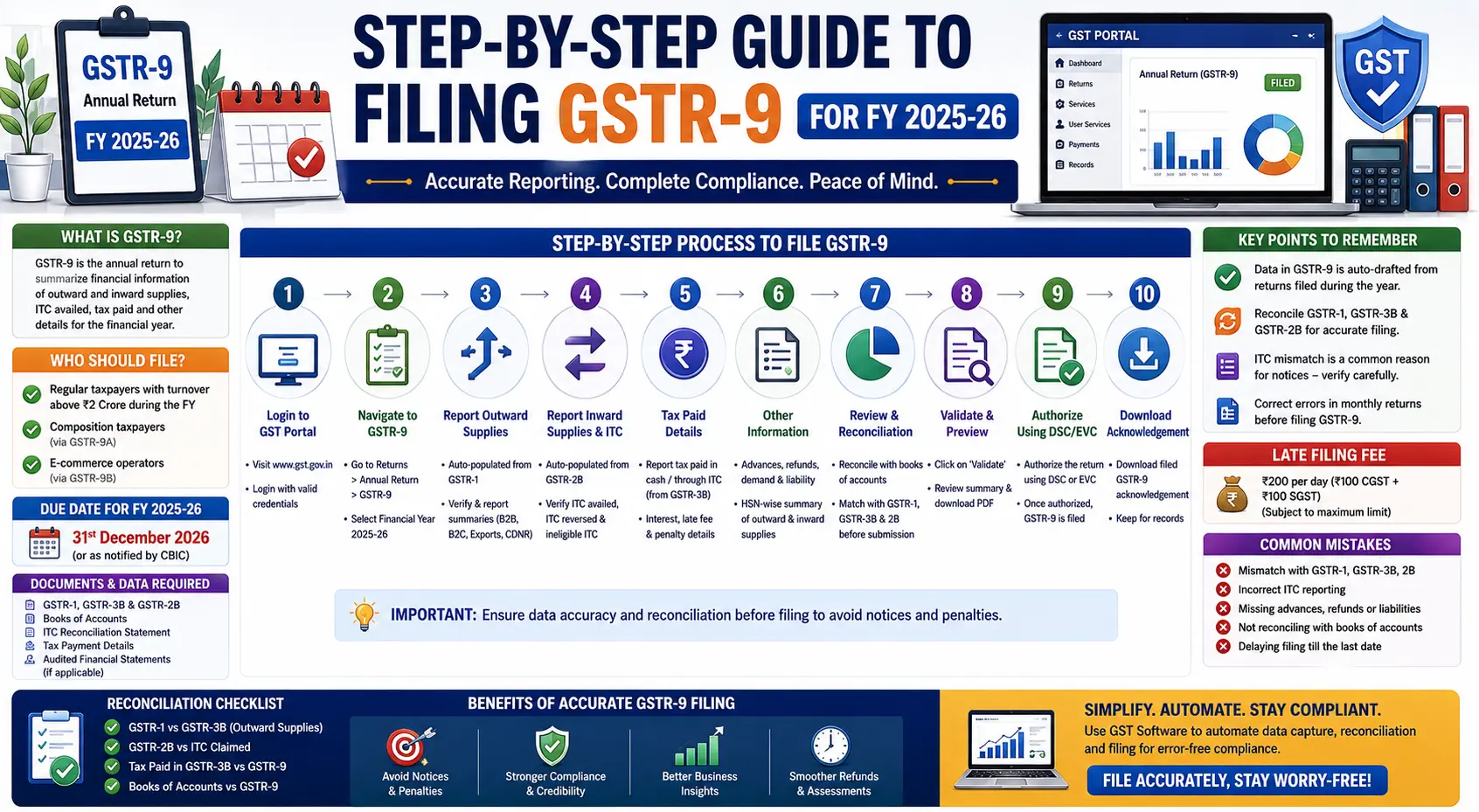
GSTR-9 is the comprehensive annual return form that must be filed by all entities registered under GST. It consolidates the information furnished in the monthly or quarterly returns filed during the year, encapsulating a summary of outward and inward supplies leading to tax liabilities and input tax credits (ITC) availed.
Who Needs to File GSTR-9?
Most GST-registered businesses must file GSTR-9 every year. However, there are exemptions:
- Taxpayers under the Composition Scheme file GSTR-9A instead.
- Input service distributors, casual taxable persons, non-resident taxable persons, and those liable to file TDS returns are exempted.
- The turnover-based requirement ensures that businesses with an aggregate annual turnover exceeding INR 2 crores in the previous fiscal year must also file the form but with the addition of a reconciliation statement in GSTR-9C.
Documents and Data Required for Filing
Preparation is key when filing GSTR-9. Ensure that the following documents and data are ready:
- GSTR-1 and GSTR-3B: Collated monthly/quarterly returns
- Audited Financial Statements: Provides the fiscal snapshot required for reconciliation
- ITC Details: Input tax credit claimed throughout the year
- Tax Payments: Records of all tax payments made
- Reconciliation Reports: To verify the consistency between the financial records and returns
Step-by-Step Filing Process on GST Portal
Filing GSTR-9 on the GST portal involves a series of systematic steps:
1. Log in to the GST Portal
Access the official GST portal using your credentials.
2. Select 'Annual Return'
Navigate to the main menu and select the 'Annual Return' tab.
3. Input the Financial Year
Select the fiscal year 2025â26.
4. Prepare the Return
Choose 'Prepare Online' to initiate the process. Ensure that you fill out sections on:
- Outward Supplies: Declare detailed sales information
- Inward Supplies: Report purchases and expenses attracting a reverse charge
- ITC Claimed: Complete ITC details against tax payments
- Tax Paid: Verify tax payments against liabilities
- Late Fees and Annual Adjustments: Account for any late fees incurred and include necessary annual adjustments
5. Preview the Draft
Examine the return for accuracy by selecting 'Preview Draft GSTR-9'. This provides a comprehensive overview, ensuring all data has been entered correctly.
6. Submit the Return
After verification, submit the GSTR-9 form and make any final confirmations.
7. File with DSC/OTP
Complete the filing process using a Digital Signature Certificate (DSC) or an OTP-based verification method.
Common Errors and How to Avoid Mismatches
Taxpayers often encounter common errors including:
- Mismatching data between GSTR-3B and GSTR-1
- Incorrect reversal or claim of ITC
- Discrepancies between financial statements and GST data
Avoid these mismatches by:
- Regularly reconciling GSTR-1, GSTR-3B, and GSTR-2B data
- Cross-checking with financial records to ensure all data aligns
Penalties, Deadlines, and Compliance Implications
Timely and correct filing of GSTR-9 is crucial. Missing the deadline incurs:
- A late fee of INR 100 per day per Act (CGST and SGST) with a cap at 0.25% of turnover
- Possible scrutiny for discrepancies leading to steep penalties
The due date for filing GSTR-9 for FY 2025-26 is typically December 31st of the subsequent year unless extended by government notifications.
Best Practices for Using GST Software
Utilizing GST compliance tools can simplify the filing process:
- Automate reconciliation between GSTR-1, 3B, and 2B
- Generate error-free reports effortlessly
- Receive alerts for deadlines and discrepancies
Implementing these tools enhances the accuracy and efficiency of your GST compliance process.
In closing, the "Step-by-Step Guide to Filing GSTR-9 for FY 2025-26 should empower businesses with the knowledge to navigate the nuances of GST filing. Staying informed, compliant, and employing the right tools will not only ease the annual return filing process but also safeguard against potential pitfalls that could impact financial health.
LEDGERS assists with compliance relating to GST through the integration of reconciliations into your accounting processes to allow the speedy identification of errors in records prior to incurring any penalties or interest. LEDGERS allows you to automate the process of synchronizing your GSTN data and tracking invoices on an invoice-by-invoice basis eliminating the need for manual corrections and the time-consuming process of verifying transactions at the end of a reporting period through the use of automatic validations from the system to facilitate revenue compliance activities.